Common MyHarrow Account questions
Accessing someone's MyHarrow Account after they have died
We cannot grant you access to the MyHarrow Account of the person who has died.
If you are their spouse or are appointed as an executor, you can register for a new MyHarrow Account using your own email address.
You can then link the Council Tax Account to your MyHarrow Account using the Council Tax Account Reference number. Once it is linked you will be able to view the payments, balance and correspondence.
Benefits
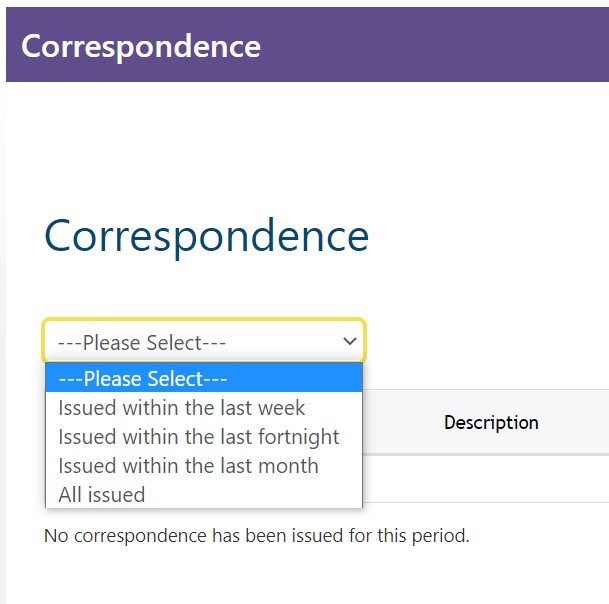
I cannot view my correspondence on MyHarrow Account
To view your correspondence, you will need to first link your Benefits account to your MyHarrow Account.
Then follow these steps::
|  |
The information is incorrect or missing on my benefit claim
If the information held by the benefits service is incorrect or needs to be updated you can notify the Benefits Service using either the evidence upload or change in circumstances form.
Report a change in circumstances
I have not received the housing benefit payment I was expecting
If you have not received a payment, first check your correspondence. You might have been asked to provide more information, or there might have been a change in your circumstances that has reduced or stopped your entitlement. A letter will have been sent to you to inform you of the reasons and any actions you must take,
Check your correspondence on MyHarrow
I cannot link a service on MyHarrow Account.
When you log in to your account you will see the MyServices page. The page shows any services you have linked to your account. If you cannot see the service you want on the MyServices page, click on 'Add service' and select 'Housing Benefit.' Click 'Continue' and answer the questions.
You will need to have your benefits reference number that you can find on any letters from the Benefits department.
If you have a new claim, you will need to wait until you receive your first decision notification letter before you can link it.
After entering your reference number you will be asked security questions. Only the claimant can link the account. If you are a partner on the claim you will not be able to get access.
If you enter the information correctly and are still unable to link the account, please report this below:
Report I cannot link a service
There is an error message on MyHarrow Account.
If you are seeing an error message on your MyHarrow Account you can complete our MyHarrow Account enquiry form.
Business Rates
I cannot link the service
To link up your business rates account you will need your 10-digit Account Reference and the Charged Property Postcode, as shown on your bill. | 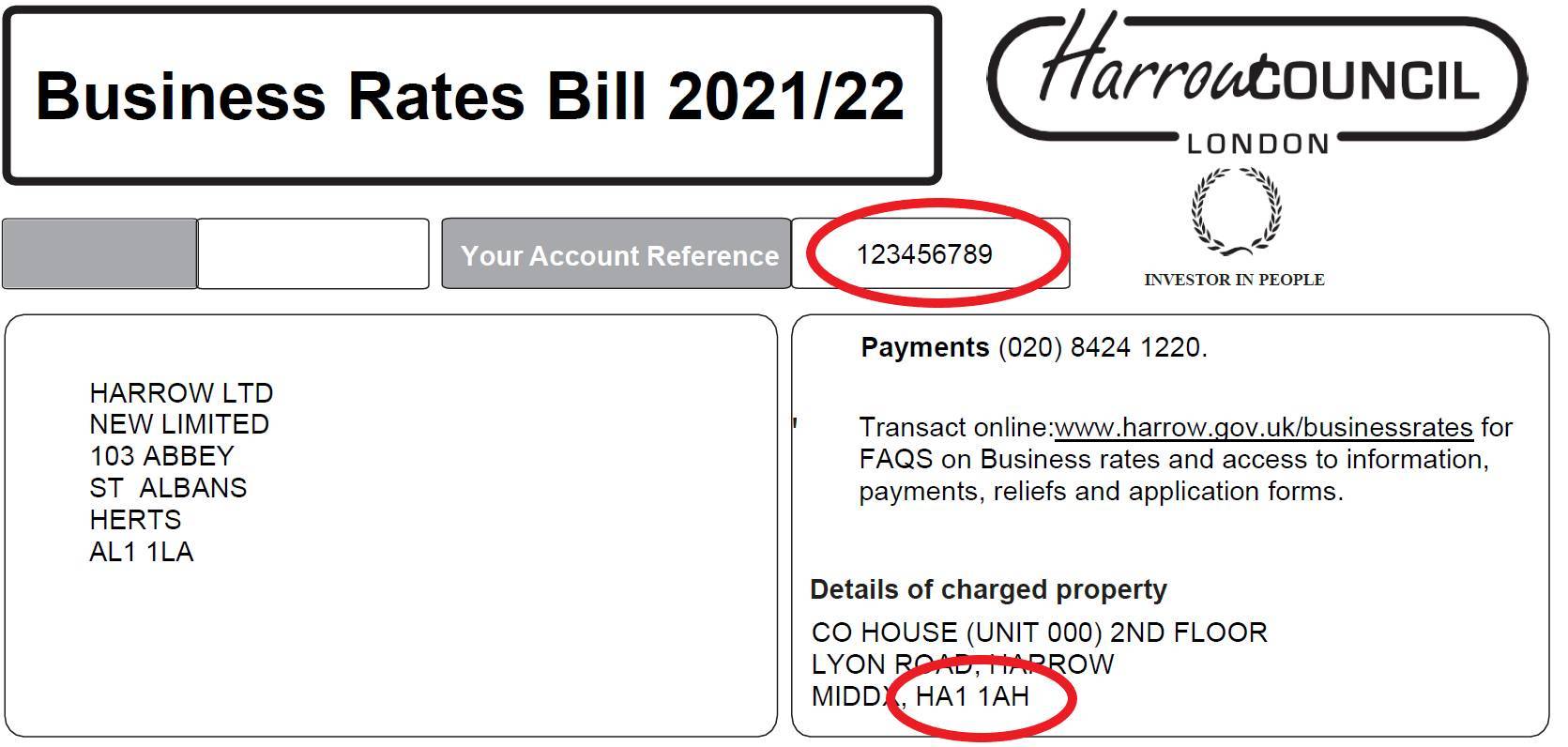 |
If you have moved in recently and not received a bill yet, please see instructions on how to Register for Business Rates.
My bill or correspondence is not showing on MyHarrow Account
To view your bills and correspondence, you will need to first link your Business Rates account to your MyHarrow Account.
You will need to:
| |
Information is incorrect on my account
If the information displayed on your MyHarrow Account is incorrect, for example a spelling mistake, you will need to tell us. You can send proof of the correct information using the evidence upload form.
Report that information is incorrect
I want to set up, change or cancel a Direct Debit
For instructions on how to do this, see Pay my business rates.
A payment is not showing on my account
Payments are displayed on your account the next working day after they are received. Different methods of payments may take longer for us to get them. If you think a payment has gone missing, send proof of the payment using the evidence upload form.
Send proof of a missing Business Rates payment
I have received a Reminder, Final Notice or Summons
You can view all your correspondence by clicking on the ‘View my letters, bills and reminders’ button on the Business Rates Summary page.
You can check what payments were missed on Payment tab on the Business Rates Summary page.
Our webpages have more information about what to do if you have received a Business Rates Reminder, Business Rates Final Notice or Business Rates Summons
I cannot submit a webform on the MyHarrow Account
If you cannot submit a webform, complete our MyHarrow Account enquiry form.
Report an issue with submitting a form
There is an error message
If you see an error message, try reloading the page or using a different web browser. If the error continues, send a screenshot of the error and description of what you were doing when it happened. You can send it using the MyHarrow Support form below.
Changing or editing your information
I want to change the address registered for MyHarrow Account
After you have logged in, you can manage your account by clicking on the drop-down menu in the top right.
Under 'Personal Details' select 'Update' and enter your postcode to find your new address. If your address is not listed see, Report my address is not listed on MyHarrow Account.
This will update your details for use on the MyHarrow Account only. You will need to inform other services of any changes separately, including services that are accessed through the account.
For example, you will need to inform the council tax department of your move by completing the Report a move for council tax form.
My address is not listed on MyHarrow account
If your address is not listed on the MyHarrow Account please report this using the form below.
Report my address is not listed on MyHarrow Account
I want to change my email address
After you have logged in you can manage your account by clicking on the drop-down menu next to your name and selecting 'MyAccount'.
Select 'Update' next to your email address. You will need to enter your password again before proceeding. You will then be able to enter your new email address and save changes.
If you have followed the above instructions and have not been able to change your email address, please report this using the form below.
Council Housing Accounts
I cannot link to my Council Housing Account
This service is not currently available for people who are:
- leaseholders
- in temporary accommodation that is not owned by the council
If you are in these categories and need to contact Housing, please navigate to the relevant tile on the Housing homepage
You can link your Council Housing Account online if you are:
- a standard council tenant
- in sheltered accommodation
- in temporary accommodation that is owned by the council
- in a shared ownership property
If you need help linking your account, see Help to link to a Council Housing account.
If you have followed the above guidance, and are still unable to link your account, please report the issue:
Report an issue linking a Council Housing Account
I cannot see 'My Repairs'
Please allow up to 24 hours after reporting a repair for it to appear online. They will remain online for 90 days after they are first reported.
Repairs reported by phone will display when a contractor is assigned. Some repairs must be looked at by a surveyor before a contractor is assigned. We will contact you to arrange a surveyor visit.
My household information on the account is incorrect
The information displayed is taken from the records held by the Housing department. If you need to notify them of a change, you can Contact your housing officer
My payments are not showing
It can take up to 24 hours for payments to show online. If a payment is not showing after 24hours, Submit a rent enquiry.
My regular charge doesn't seem right
The regular charge displayed is the most recent amount charged to your account. Most of the time this will be your weekly rent, however sometimes it could be something else, such as an adjustment. If you have any questions about charges you should Contact your rent officer.
Council Tax
Where can I get my Council tax reference number?
Your council tax reference number is on your bill and any other council tax letters that have been sent to you.
If you have moved in recently and not yet received a bill, you will need to complete our moving form.
Once you complete this form, you will need to wait for the Council Tax team to send you a bill with your reference number on it.
You do not need to log in to access the form. There is a button below the login details for you to 'Continue as a guest' | 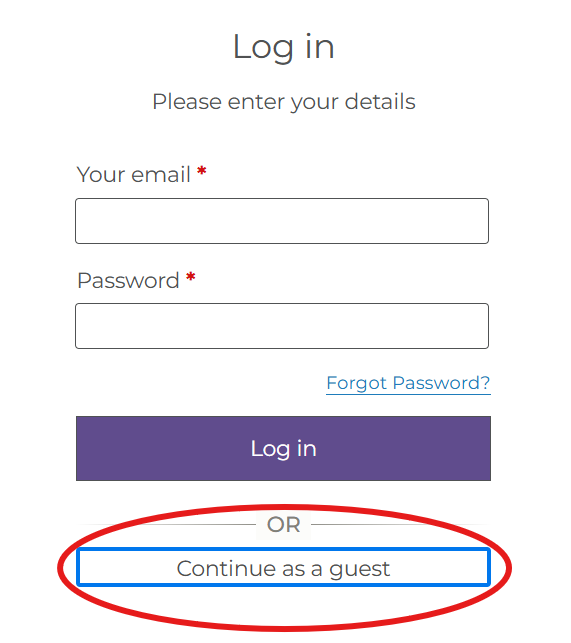 |
Complete the Council Tax moving form
I have lost my reference number
If you have lost your bill and need your council tax reference number please complete the form below.
Do not use this form to report a move or chase a bill as such requests will not be responded to.
Request a lost council tax reference number
My bill or correspondence is not showing on MyHarrow Account
To view your bills and correspondence, you will need to first link your Council Tax account to your MyHarrow Account.
You will need to:
| |
I want to switch between e-billing and paper bills for my Council Tax
By default, you will still be sent paper bills by post unless you choose not to.
To view and change your billing preference you will need to:
- Select 'Show Details'
- Select 'Manage my e-billing'.
- Select the option to change your preference and submit the form.
You can view your bills online regardless of your billing preference.
Log in to change billing preference
A payment is not showing on my account
Payments are displayed on your account the next working day after they are received. Please note that different methods of payments may take longer for us to receive them. If you think a payment has gone missing, please send proof of the payment using the evidence upload form.
Send proof of a missing Council Tax payment
I have received a Reminder, Final Notice or Summons
You can view all your correspondence by clicking on the ‘View my bills and reminders’ button on the Council Tax Summary page.
You can check what payments have been missed by looking at the Payment tab on the Council Tax Summary page.
Our webpages have more information about what to do if you have received a Reminder, Final Notice or Summons
I want to set up, change or cancel a Direct Debit
There is a single form for Direct Debit set-ups, changes or cancellations. You do not need to log in to your account to submit the form, you can select the option 'Complete a form without logging in'.
I want to add someone to my council tax bill
Not everyone who lives in a household will be able to be included on your bill. For information on who can be included and how to request for them to be added, see Add someone to your council tax account
The name is spelt incorrectly on my Council Tax account
If there is a mistake in the spelling of your name, or if you have changed your name due to marriage, you can send the details using the links below.
Report a change of name due to marriage
Report a spelling mistake on my bill
There is an error message on MyHarrow Account.
If you are seeing an error message on your MyHarrow Account you can complete our MyHarrow Account enquiry form.

Error messages
If you see an error message, try reloading the page or using a different web browser. If the error continues, please send a screenshot of the error and description of what you were doing when the error occurred using the MyHarrow Support form below.
Issues with online forms
Not all forms require you to log in. If it is not required there will be a button below the login details for you to 'Complete a form without logging in' | 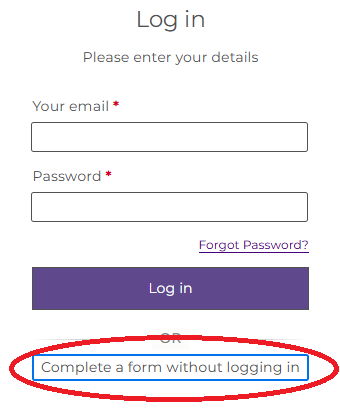 |
The following webforms can be accessed through your MyHarrow Account:
- Council Tax: Manage my Direct Debit
- Council Tax: Evidence upload
- Council Tax: Report a change of address
- Council Tax: Apply for a single person's discount
- Benefits: Apply for council tax support and housing benefits (log in required)
- Benefits: Housing Benefit evidence upload
- Benefits: Dispute or appeal (log in required)
- Benefits: Report a change of my circumstances (log in required)
If you experience any issues with the forms listed, please see further guidance below. Issues with any other online forms can not be reported using the links below.
The form does not validate my details
Please make sure that the name and address that is registered to your MyHarrow Account is the same name and address that is registered to your service account. As the form validates your details through the information that is registered to your MyHarrow Account, you will need to make sure that the information matches.
If you have checked the information matches and the form still won't validate, report this using the form below.

I want to delete MyHarrow Account
Deleting your MyHarrow Account will mean that you will no longer be able to log in, and access services provided through the account. Deleting your account will not change the information held by different council departments.
If you want to delete your account because of a change in circumstances or a move, you must also notify each relevant department separately.
To delete your account:
- When you are in your account, click in the menu in the top right and select 'My Account'
- On the 'My Personal Information' select 'Delete account'
- Check your email for the code
- Enter the code and select 'Delete'
Landlords with tenants on housing benefits
Where can I find my Landlord reference number?
This service is for landlords who get housing benefit payments direct from the council on behalf of their tenants.
Your reference number will appear on any letters sent to you by the housing benefit department.
I cannot view my correspondence on MyHarrow Account
To view your bills and correspondence, you will need to first link your Landlord account to your MyHarrow Account. Then you will need to:
|
|
I haven't received a payment
You can view payments we've made on your MyHarrow account. If you've not received a payment, you will need to contact your tenant.
I cannot link a service on MyHarrow Account.
To link your account you will need your Landlord Reference number, which you will find on letters for payment schedules from the Benefits Service.
After entering your reference number you will need to answer the security questions. You do not need to answer all the questions. Answer those that you know the answer to. When you have answered enough questions, an alert will tell you that you can continue.
When entering the ‘Date of last housing benefit paid to you,’ please note that the payment takes 2 working days to reach your bank account. For example, if your last payment was on a Monday, enter the date of the Thursday before.
If you are struggling to link a service on your MyHarrow Account you can complete our MyHarrow Account enquiry form below.
Report an issue linking a service
There is an error message on MyHarrow Account.
If you are seeing an error message on your MyHarrow Account you can complete our MyHarrow Account enquiry form below.
Licensing
Use the form below if you:
- need help to register for an account and add a licence
- need to request access for an agent or representative to manage annual fees or renewal applications.
- receive an error message saying “This licence is not linked to your account” when trying to submit an annual fee or renewal application.
- are having trouble registering on the new licensing system.
- are having trouble adding a licence to an account.
- are having trouble accessing an annual fee or renewal application through the link in a reminder letter

Linking services
Linking a service
- Log in to your MyHarrow Account
- On the 'My Services' page select 'Add Service'
- Select the service you want to add and select 'Continue' at the bottom of the screen'
- Answer the security questions
- Repeat the process to link more services
See below for further guidance on adding each type of service.
Report an issue linking a service
Linking a Council Tax account
If you have entered the details as they appear on your bill and still cannot link the service, please complete the enquiry form below.
You can link to more than one Council Tax account. If you move home you can link to your new account and still access your old account.
Report an issue linking a council tax account
Linking a benefits claim
To link to the benefits service you will need to have your benefits reference number that you can find on any letters from the Benefits department.
If you have a new claim, you will need to wait until you receive your first decision notification letter before it can be linked.
After entering your reference number you will be asked security questions. You should answer those that you know the answer to and you will be instructed when you have given enough information to continue. Only the claimant can link the account. If you are a partner on the claim you will not be able to get access.
If you have entered the information correctly and are still unable to link the account please complete the enquiry form below.
Report an issue linking a benefits claim
Linking a landlord account
The landlord account service is for landlords who receive their tenant's housing benefits directly from the council.
To link your account you will need your Landlord Reference number, which you will find on letters for payment schedules from the Benefits Service.
After entering your reference number you will need to answer the security questions. You do not need to answer all the questions. Answer those that you know the answer to, and when you have answered enough, an alert will tell you that you can continue.
When entering the ‘Date of last housing benefit paid to you,’ please note that the payment takes 2 working days to reach your bank account. For example, if your last payment was on a Monday, enter the date of the Thursday before.
Report an issue linking a landlord account
Linking a Council Housing Account
This service is not currently available for people who are:
- leaseholders
- in temporary accommodation that is not owned by the council
If you are in these categories and need to contact Housing, please navigate to the relevant tile on the Housing homepage
You can link your Council Housing Account online if you are:
- a standard council tenant
- in sheltered accommodation
- in temporary accommodation that is owned by the council
- in a shared ownership property
If you need help linking your account, see Help to link to a Council Housing account.
If you have followed the above guidance, and are still unable to link your account, please report the issue:
Report an issue linking a Council Housing Account
Linking a school waiting list account
You will need valid school waiting list reference number to link your account.
If you have submitted a new Primary/Secondary school application, the reference number will be in the following format xxx-xxxx-09-x-xxxxxx.
If you have submitted an In year school admission application, the reference number will be in the following format 310-xxxx-xx-K-xxxxxx.
Please make sure that the parent's name and address that is registered to the Child's waiting list, is the same parent's name and address that is registered to your MyHarrow Account. This must be an exact match.
If you need to update your address details, click on the drop-down menu in the top right and select 'My Account'.

My address is not listed on MyHarrow Account
If an address is not listed on the MyHarrow Account please report this using the form below.
Password and login issues
What happens if I have forgotten my MyHarrow Account password?
If you have forgotten your MyHarrow Account password you can reset your password following the 'I forgot my password' link. Please note that the password reset links expire if they are not used within 24 hours. If the link has expired you can request another one using the same 'I forgot my password' link.
If you have not received the forgotten password email, please check your junk or spam folders.
I have not received my password reset email
It is possible that you are not registered. Try to Register for a new account. If a profile already exists for your email address, then the registration form will not allow you to proceed and you should follow the instructions below.
If you have not received the forgotten password or activation email, please check your junk or spam folders.
We are aware that some email service providers will block the ‘forgotten password’ and ‘activation link’ emails. These include Virgin Media and NTLWorld. If you have another email address please try using that.
If you have followed the instructions above and still not received the email, please contact us using the form below.
Report an issue with the password reset email
My sign in attempts have exceeded the limit
You will need to submit the form below to request for your account to be unlocked.

Registration issues
The activation link has expired
Activation links expire after 24 hours.
If the activation link has expired, you can request a replacement link by entering your email address as though it was a forgotten password.
I have not received the activation link or it is not working
Please check your spam and junk email boxes for the forgotten password email from noreply@harrow.gov.uk.
If the link has expired or is not working you can request another by selecting 'I forgot my password'.
We are aware that some email servers have blocked the forgotten password and activation link from mail inboxes, including Virgin Media and NTLWorld. If you have another email address please try using that.
If you have followed the instructions above and still not received the email, please contact us using the form below.
Report an issue with the activation link
My address is not listed on MyHarrow account
If your address is not listed on the MyHarrow Account please report this using the form below.
School waiting list
The service is now available again for the new academic year.
You'll need to subscribe again. Old reference numbers will not work. New reference numbers will be sent to Reception and 11+ applicants for the new academic year.
If you need to make a new application, you can complete an in-year application for the new academic year.
Linking a school waiting list account
You will need valid school waiting list reference number to link your account.
If you have submitted a new Primary/Secondary school application, the reference number will be in the following format xxx-xxxx-09-x-xxxxxx.
If you have submitted an In year school admission application, the reference number will be in the following format 310-xxxx-xx-K-xxxxxx.
Please make sure that the parent's name and address that is registered to the Child's waiting list, is the same parent's name and address that is registered to your MyHarrow Account. This must be an exact match.
If you need to update your address details, click on the drop-down menu in the top right and select 'My Account'.
How do I apply for a school place?
You can apply for a school place on our Apply for a school place page.
To apply for a place during a school year, see Apply for an in-year school place.
My school reference number isn't recognised on MyHarrow Account
If your schools reference number is not being recognised on your MyHarrow Account you can complete our MyHarrow Account enquiry form below.
You must wait for your School Reference Number before you can link to this service. This is different to the application number and may be sent to you up to 30 school days after your application.